Find duplicate samples, even when the names differ
The same kick sits in three folders under two names. You bought the pack twice, unzipped it once into Downloads and once into your library, then copied a few favorites into a project folder. Every copy shows up in every search.
Why file names can't find duplicates
Matching by name fails both ways. The same sound gets renamed when it's copied or exported, so two identical files can have different names. And different sounds share names all the time: every pack has a kick 01.wav.
The reliable test is the contents. A checksum such as SHA-256 is a fingerprint of a file's bytes: two files get the same fingerprint only if every byte matches, whatever they're called and wherever they live.
How WavSniper finds them
When WavSniper scans your folders it takes a SHA-256 fingerprint of every file. Click Duplicates and it lists every set of identical files, with how much space each set wastes.
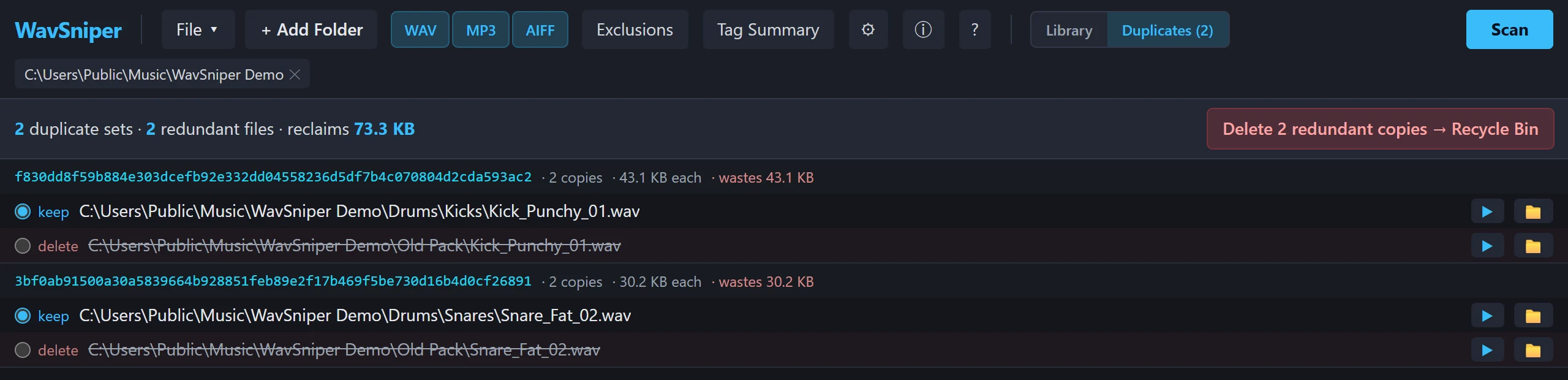
In each set, choose the copy to keep. Then Delete redundant copies sends the rest to the Recycle Bin. Nothing is deleted outright, so anything you change your mind about can be restored from there.
Hearts and crates belong to the sound, not to one path, so they stay with the copy you keep.
What counts as a duplicate
Only identical files. A sample that was trimmed, re-exported, normalized or saved in another format is a different file, even if it sounds the same, so it isn't flagged. That's deliberate: nothing you edited on purpose gets offered for deletion.
Questions
How do I find duplicate samples with different file names?
Compare file contents instead of names. WavSniper takes a SHA-256 fingerprint of every file it scans and groups the files whose fingerprints match, whatever they are called or where they are.
Does WavSniper delete duplicate files permanently?
No. The copies you choose not to keep go to the Windows Recycle Bin, so they can be restored.
Will it flag samples that only sound alike?
No. It finds identical files only. A sample that was trimmed, re-exported or converted is a different file and is not flagged.
Find the sound, hear it, drag it in. WavSniper is free to try for 14 days.